Fortnite Loot Path Creator
Plan a Fortnite loot path: choose a landing spot, mark the area you want to search, then generate and edit an ordered route through supported map points.
Open Lootpath Creator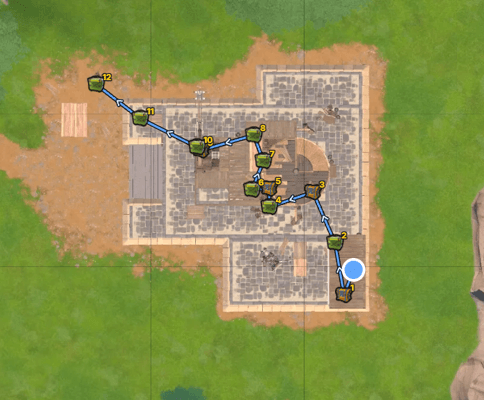
How it works
- 01
Choose a landing spot
Set the place where your drop begins. The route starts from your waypoint.
- 02
Mark the loot area
Draw a rectangle around the part of the Fortnite map you want to search.
- 03
Generate and edit the route
Build an ordered path from enabled loot layers, then review or adjust its stops.
Plan a useful Fortnite loot path
Start with a landing spot you can reach reliably. Select a loot area around it, then use the enabled chest and other supported loot layers to generate a route. Check the numbered stops on the map before your match; you can change their order, add labels or export the plan as a PNG.
A good loot path depends on your landing, the loot points available in the selected area and where you want to rotate next. The generator estimates stop order and distance from map coordinates. It does not verify a walkable path around walls, buildings or terrain, so review the line against the map and adjust it for the route you intend to play.
Fortnite Loot Path Creator FAQ
Plan your next drop
Check beta access in the planner or join Discord for release updates.